

You’re probably already using an AI harness, and that’s exactly why the word is so confusing.
I’d heard the word in a few YouTube videos I watch, and then a message in my work team chat said there’s work underway to set up a harness.
I wasn’t sure what it meant, so I stopped and looked it up.
What I found is that a harness is the machinery that turns an AI model into something that does work. Ironically, I’d been using one without knowing it.
At work, that tool was Cursor.
What Is an AI Harness and What Does It Do?
A model takes text in and gives text back. On its own, it can’t keep state between interactions, run code, look up current information, or set up its own environment.
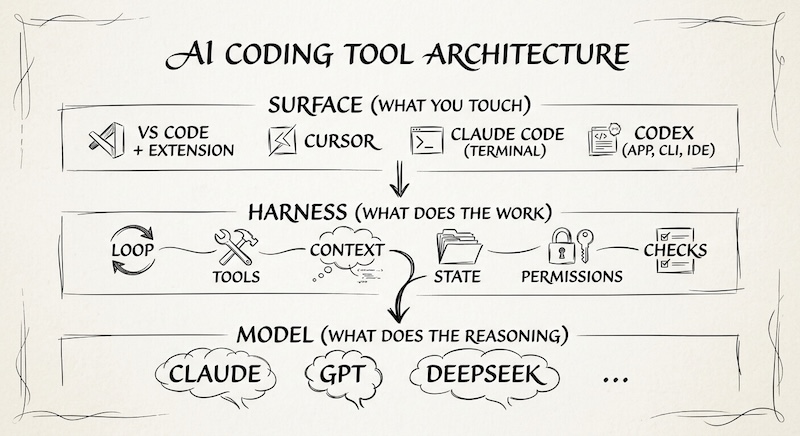
The harness is everything wrapped around the model that makes those things possible. It’s every piece of code, configuration, and execution logic that isn’t the model itself.
Even a basic chat has one. The app keeps track of your earlier messages and adds each new one before it calls the model, which is why the model seems to remember what you said two messages ago.
Tip: You can see this very interaction when chatting with Eve on my portfolio! Both in the UI when interacting and in the source code of my repo in the blog post about how it came together.
The harness’s job is to take a model that generates answers and make it carry out work. This is usually done by the model proposing a step, and the harness deciding:
- what context the model sees
- which tools it can call
- what it’s allowed to change
- when the job is done
I built an accessibility sub-agent in Cursor, and it’s one of the clearest examples I have.
A sub-agent is a second agent that the main agent hands a task to. Mine runs on a hook, a script that fires at a set point in the work, and a rules file of written instructions that tell it what accessible means for my project.
The model supplies the reasoning. The rules supply the standard. And the hook decides when the check runs.
Together, those three pieces are a harness, even though I never called them one.
IDE, Terminal, or Desktop App: What’s the Difference?
These days, AI comes in all kinds of shapes, but those are mediums, meaning the places you sit when you talk to an AI.
The harness sits underneath them, so “IDE vs harness” is the wrong comparison 💁♀️
VS Code is a general-purpose code editor, and AI reaches it through extensions. Cursor is an editor built around AI agents, and its agent runs on Cursor’s own harness.
Claude Code lives in the terminal, and Anthropic calls it a flexible agent harness.
Codex comes as a desktop app, but the open-source Codex harness powers its app, command-line tool, and IDE extension alike.
Hermes Agent goes a step further with one core class serving its command-line interface, messaging gateway, editor integration, batch runs, and API server.
So, when moving between these tools, the question isn’t whether a harness exists, but which harness you’re on, how much of it you can configure, and how it looks on screen.
Note 👁️
The Codex example makes the difference easy to see. OpenAI says the open-source Codex harness powers all of its Codex experiences, so the surface can change while the machinery underneath stays the same.
Explore: Why OpenClaw And Hermes AI Agents Aren’t Actually Free
Is Cursor an AI Harness?
Yes, and Cursor says so itself. Its documentation says an agent is built on three components: instructions, tools, and a model.
Then the harness and the model together determine how good the agent is.
In fact, the same model, when tuned to a harness, is noticeably faster, smarter, and more efficient. The harness also gives each model the tool format that model was trained on.
For example, OpenAI’s models are trained on a patch-based format for editing files, and Anthropic’s are trained on string replacement. These two different approaches have different failure modes, so forcing one onto a model that’s not trained for it increases error rates.
Now, if you’re anything like me and you’ve gotten maybe to a particular task in, say, Cursor, that’s not going anywhere (aka output isn’t what I expected), it may be tempting to switch models. However, in almost every case I’ve tried this, it doesn’t work because the models end up pulling each other off track.
Sometimes one makes a useful fix, but by then the conversation has drifted. The new model has to work with tool calls a different model produced, and switching also costs a slower, more expensive first turn.
Tip 💯
Cursor generally recommends staying with one model for a conversation unless you have a reason to switch. If you want a second opinion from another model, use a sub-agent instead of switching mid-chat since a sub-agent starts with a fresh context window.
What Does “My Harness” Actually Mean?
When someone says “my harness,” they usually mean one of three things. Here they are from lightest to heaviest:
1. Configuring
This is when you change settings, permissions, and instruction files on an existing harness. My rules files sit in this group.
Related: All You Need To Know About AI Workflow Files And How To Use Them
2. Extending
Moving on, this is when you add capabilities on top of an existing harness, such as tools through MCP, skills, hooks, plugins, or sub-agents.
For example, my accessibility sub-agent is an extension since it consists of a sub-agent, hook, and rules, all running on Cursor’s harness.
3. Building
Lastly, this is when you write the runtime yourself, from loop and tool handling to context management and saved state.
This is obviously a much bigger job than the first two.
Explore: What Is MCP, And Why Can’t You Just Use an API?
Why Do Companies Build Their Own AI Harness?
A company that builds its own usually needs to control something the existing tool doesn’t let it control. Not so much because it’s trendy.
OpenAI describes that control as the host application deciding where an agent runs, which files or tools it can access, which actions need approval, how the work is observed, and how results return to the system of record.
Notice how all of those are decisions companies tend to want to make themselves.
As an example, Cogent evaluated existing agent frameworks and coding harnesses before building its own. It found that adopting a loop doesn’t connect an agent to a customer’s live context, identity and access controls, remediation lifecycle, or verification criteria. So Cogent owns that boundary and plugs external execution engines in behind it.
When someone says “we’re building a harness” in a planning meeting, ask what they need to control that the current setup doesn’t allow.
You can also raise the concerns that tend to matter most, such as:
- who owns the knowledge the agent accumulates
- what gets logged
- what happens to the workflow when the underlying model changes
To do this, you don’t need to know every technical detail; you just need to know what the harness is for.
Do You Need Your Own AI Harness? Five Questions to Ask First
In a way, each question below tests the same thing: what problem can’t your current setup solve?
Because remember, building a custom harness isn’t a small task. It will take decision-making, planning, research, in addition to execution and maintenance.
- Is the work actually agentic? An agent looks at information, takes an action, checks the result, and keeps going across several steps. If one model call or a fixed script does the job, you don’t need a harness.
- What do you need to control that your current harness doesn’t let you control? This is the most important question. Name the specific thing, like data that leaves the environment, who signs off on an action, or which systems the agent can reach. If you can’t name it, don’t build yet.
- Is the workflow narrow enough that general-purpose behavior gets in the way? A general coding agent is great for exploring. A fixed internal workflow, like triaging one type of support ticket, can use fixed steps, a few tools, and tight permissions.
- Do you actually need to own the runtime? Could configuring or extending Codex, Claude Code, Cursor, or an agent SDK solve the problem? Owning a runtime means maintaining it. Cogent evaluated existing harnesses first and still chose to own the boundary, so the answer isn’t always no. But it was a deliberate call after research, not a default.
- How will you know yours is better? Without an evaluation loop, you’re mostly accumulating configuration instead of engineering reliability. Track failures, completion time, cost, and how often a person has to fix the output.
I find an example helpful here, so say a team wants an agent to triage support tickets. The agent reads a ticket, checks the customer’s plan, and picks a category, which is several steps, not one request, so that’s a yes to question one.
It must never see payment details, which answers question two. Sorting one kind of ticket is narrow, so question three is also a yes.
If your tool’s permission settings can already keep the agent away from payment data, question four’s answer is no; you don’t need to build anything, just configure what you have.
The team would track how often the category is right, which is question five.
Now, if all five get specific answers, building starts to make sense. But if question two gets a shrug, keep the harness you have 💁♀️
How Does an AI Harness Work, Step by Step?
The model doesn’t remember anything between requests. Each turn, the harness rebuilds the whole conversation—system prompt, tool definitions, and messages—and sends it back.
Then the model replies with either an answer or a request to use a tool. It’s the harness that runs the tool, sends the result back, and the model decides what happens next.
LangChain describes the same pattern as a loop where the model reasons, takes an action through a tool, observes the result, and repeats.
context + task
→ model proposes a step
→ harness checks permission → tool runs → result returns to context
→ done, or next step
Note: Every pass through that loop is a place where a harness can add a rule, check, or limit. That’s where most of the control lives.
How Do You Build an AI Harness?
Well, almost nobody starts from scratch. OpenAI says if you’re building software that needs an agent, you can start with Codex (non-proprietary parts are open source) instead of inventing a new runtime, then decide what the surrounding application should own.
Tip: The usual path is to configure first, extend next, and write the loop yourself only when the runtime is the product.
Start by defining the job. Something like “Fix lint errors on open pull requests and post a summary” passes or fails. “Build an AI agent” gives you nothing to test.
Check what an existing harness or SDK already covers before you build anything new.
From there, you’re really just answering three questions:
- What can the agent touch?
- What counts as done?
- When should any of this actually run?
The first two get the obvious attention. What it can touch is the environment (what it can see, change, reach, and what needs your approval first). What counts as done is verification, and “the model says it worked” isn’t proof 😒
Anthropic’s long-running agent work makes that point well. Claude kept marking features complete without testing them end to end, until it was prompted to test the way a human user would. The fix was a harness that forced real checks into the loop, not a better prompt.
The third question is the one I underrated with my accessibility hook. I had the “what” and the “done” figured out: a sub-agent that checked components against a rules file.
What I skipped was when it should run. At first, I set it to fire automatically on every change, but the whole point was to save me rounds of manual checking and my token quota (by making accessible implementations uniform and consistent without multiple rounds of iterations).
Instead, I was wasting resources on unnecessary checks with rudimentary guards. Defeats the purpose 🙈
My solution was to clearly define and restrict runtime based on my actual use case, which, in this particular case, was upon an actual trigger in the prompt. That provided the most control that best suits my workflow.
Tip: Decide when a check should run before you automate it. An automatic check runs on everything.
Last comes improving from failures. When something breaks, find the piece behind it. Whether it’s a missing tool, an unclear permission, or a check that doesn’t exist yet, surface and fix that piece. Most people start scrutinizing the prompt, but that’s rarely the answer.
Why Does Harness Engineering Change the Same Model’s Results?
Harness engineering sounds like prompt writing, but it’s closer to designing the system around the model. That system consists of the context, tool access, permissions, saved state, recovery, verification, and evaluation.
Cursor works this way. It forms hypotheses, runs experiments, and A/B tests harness versions on real usage. One of its measures is the Keep Rate, the share of agent-written code still in the codebase after fixed intervals.
Tool errors matter a lot here because a failed tool call stays in context, wasting tokens and causing what Cursor calls context rot, where accumulated mistakes degrade later decisions.
The effect shows up outside Cursor too. LangChain says it moved its coding agent from the top 30 to the top 5 on Terminal Bench 2.0 by changing only the harness. The same model can also score very differently across harnesses, with LangChain noting that Opus 4.6 in Claude Code scores well below Opus 4.6 in other harnesses on the same benchmark.
This is all to say that the system around the model (aka the harness) is just as important as the model. Usually, when eval teams evaluate an agent, they’re evaluating the model and harness together.
My view is model plus harness. I’m skeptical of the louder version where the model is interchangeable and only the harness counts.
It’s a Wrap
If you take one thing from this post, let it be that most people don’t need to build a harness. They need to decide how much of the harness they actually need to own.
There almost always is one already underneath, and the useful question is which part of your system you’re talking about and what that part needs to control.
The model is the model. The harness is the machinery that lets it work.
The IDE, terminal, or desktop app is where you sit while it runs.
Next time someone says they’re building a harness, you can ask what they need to control that the current one doesn’t give them, and whether a configured version of something they already use would get them there.
You don’t have to know the answer to ask the question!
I hope this gave you some clarity. It certainly did to me.
I’ll see ya on the next one 👋


