

Alright friends, get ready, because this is a full walkthrough of how I re-engineered my portfolio chatbot from a naïve, stateless experiment into a context-aware, production-hardened RAG system that actually feels smart.
Anyone hanging out with us at THT knows we’re big believers in learning by building.
And, if you’ve spent any time poking around my portfolio (Klea here, hi 👋), you’ve probably seen Eve the chatbot sitting there, confidently answering questions about my work.
What you didn’t see was how fragile that thing used to be. I’ve known for quite a while that it was a bit of a mess, but kept putting off the necessary optimization 👉 👈
The chatbot technically worked, but only in the most literal sense and provided the most basic of smarts. Under the hood, it was a stateless script that “read” JSON files like a robot with short-term memory loss.
It could answer direct, one-off questions reasonably well.
If you asked, “What projects has Klea worked on?”, it would list them out. But following up with, “Can you give me the links for those?”, made the bot completely blank out 😬
That’s because it didn’t know what “those” referred to since every request was treated as a brand-new universe.
No memory or continuity. No sense of shared context. There was no real conversation.
The reality: this wasn’t just a prompt issue or a “better model” problem—the architecture itself was flawed.
How Proper RAG Makes a Big Difference
I realized it was time to move past basic “data searching” and build a professional-grade RAG (Retrieval-Augmented Generation) system. Not something flashy or over-engineered, but something that was:
- Context-aware (it remembers what we’re talking about)
- Efficient (it doesn’t re-embed everything on every run)
- Production-hardened (secure, predictable, and maintainable)
In this walkthrough, we’re going deep into the transformation from a fragmented, stateless script into a genuinely capable AI assistant.
We’ll cover everything from Knowledge Vectorization to Database Hardening to Context Drift, and, more importantly, why each of those things mattered in practice.
At the end, we’ll achieve the following gains. Note: same question, same AI model, same data, but considerably upgraded (and accurate!) results 👇

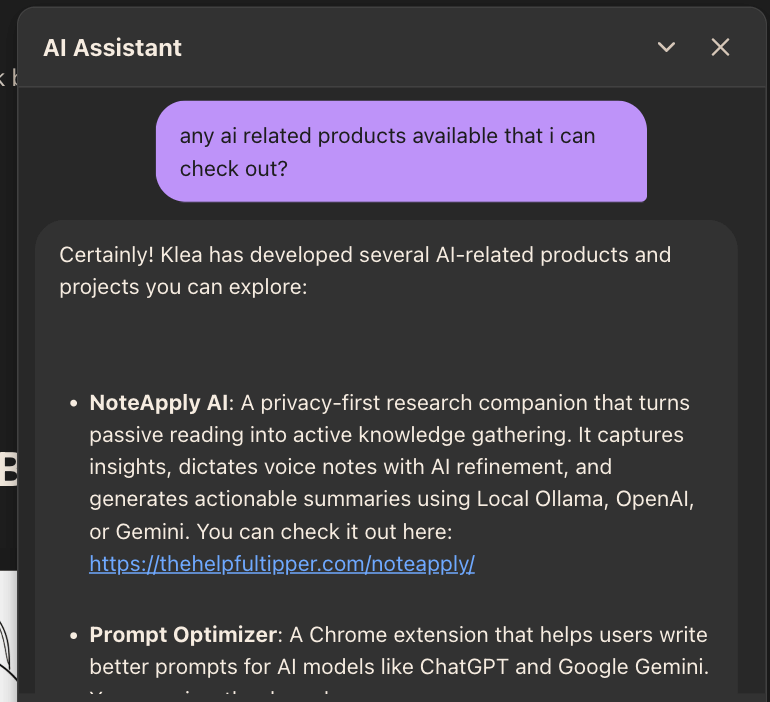

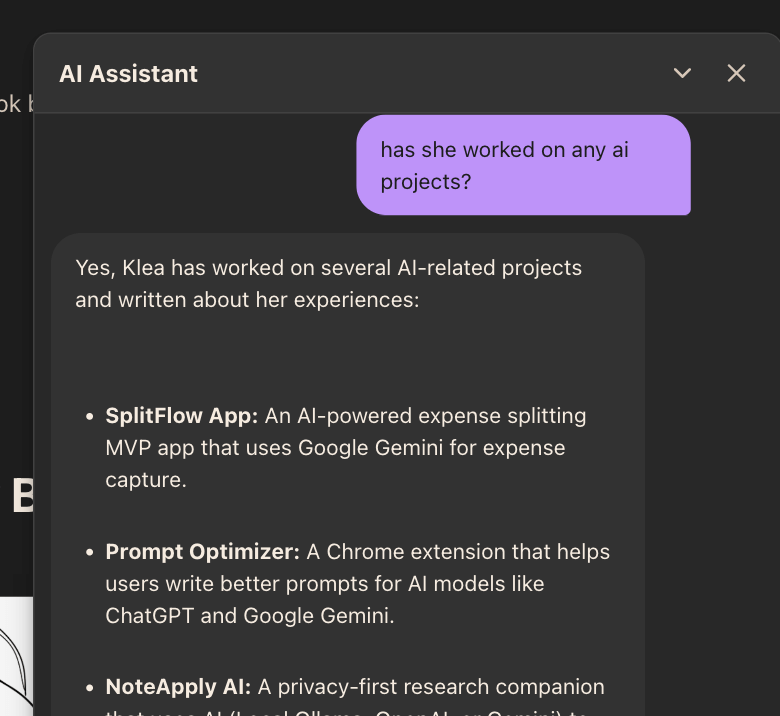
Let’s tackle this together!
Phase 1: The Initial State & Diagnosis (The “Why” Behind the Pivot)
Before we look at the shiny new version, we have to be honest about the version that failed.
This is one of those cases where the system wasn’t “almost right”—it was fundamentally pointed in the wrong direction.
The original setup looked reasonable on paper:
- A Gatsby site
- Content stored as JSON files
- Supabase Edge Functions
pgvectorwith 384-dimension embeddings- A recursive Node script that stringified nested JSON objects and embedded them
Nothing here is wrong in isolation.
The problem was how all of these pieces interacted once real questions—and real follow-ups—entered the picture.
The Baseline Data Landscape: Why JSON isn’t “AI-Ready”
To understand why the old approach broke down, let’s look closely at the shape of the data.
All of the portfolio content lives in structured JSON files inside src/data.
Here’s a simplified fragment from projects.json:
[
  {
    "title": "SplitFlow App",
    "description": "AI-powered expense splitting...",
    "meta": {
      "stack": ["Google Gemini", "Supabase", "TypeScript"],
      "category": ["React"]
    }
  }
]
And a fragment from resume.json:
{
  "resume": {
    "experience": [
      {
        "company": "Experian",
        "dates": "Sep 2023-Sep 2025",
        "desc": ["Architected migration...", "Mentor teammates..."]
      }
    ]
  }
}
This kind of structure is fantastic for Gatsby, GraphQL, and rendering pages. But for embeddings? It’s deceptively dangerous.
In the original script, these objects were recursively traversed and passed through JSON.stringify.
Explore the original: This Is How To Build A Smart Custom AI Chatbot
That meant each nested piece of data—titles, descriptions, arrays, metadata—was flattened and chunked without preserving relationships between fields.
From the AI’s perspective, "React" became just a word floating in vector space, detached from which project used it, who built it, or why it mattered.
Hey! Don’t judge too harshly. This was my first attempt with RAG and vectorization so it’s been a learning curve. For anyone who rolls their eyes at “yet another chatbot”, I’ve one thing to say: Building a chatbot is a phenomenal learning experience that allows anyone to dip their toes into the world of AI training and fundamentals.
Related: I Built A Free AI Chatbot For The First Time – Here’s Everything That Went Wrong (And Right)
Identified Issues: Four Failure Points of Naive RAG
As the dataset grew and the chatbot saw more real-world use, four major cracks appeared.
1. Contextual Disconnection
Recursive stringification treated every JSON key like an island.
In practice, this meant that the vector representing "link": "..." had no mathematical relationship to "title": "SplitFlow", because they lived in separate chunks.
If the retrieval step found one but not the other, the model couldn’t reconstruct the relationship.
2. Semantic Noise
Using JSON.stringify(item) forced the embedding model to process syntax—braces {}, quotes ", and keys like "id":—instead of meaning.
The model was spending part of its embedding capacity encoding structure, not knowledge. That’s a terrible trade-off 🤦♀️
3. Inefficient Updates
There was no concept of change detection.
Without a hashing mechanism, it’s likely to re-embed data that hasn’t changed, wasting credits and Supabase resources, or worse, creating duplicate vectors if the “delete-old-data” logic isn’t perfect.
4. Security & Database Vulnerability
I’ll own this one: RLS (Row Level Security) was disabled, extensions lived in the public schema, and SQL functions had mutable search paths 😓
It worked, but it also left the database vulnerable to search-path hijacking and accidental data exposure. (Cheers to hoping hackers wouldn’t want to hack my portfolio.)
At this point, it was clear that patching prompts wouldn’t help. The foundation itself needed to change.
Phase 2: Solution Architecture (Moving to Knowledge Vectorization)
The turning point came when I stopped thinking of embeddings as a way to “store data” and started thinking of them as a way to store knowledge.
Data is raw. Knowledge is contextual.
To get there, we moved away from naive data vectorization and toward Knowledge Vectorization—encoding relationships explicitly, in language a human would naturally use.
I know, takes some getting used to the fact AI prefers knowledge to raw data 😅
The “Breadcrumb” Transformation Logic
Instead of embedding raw JSON blobs, the processing script now transforms content into breadcrumb sentences: small, human-readable statements that carry their own context.
For example:
- Raw Data:
["React", "TypeScript"] - Breadcrumb String:
"Klea Merkuri's project 'SplitFlow' was built using React and TypeScript."
See the difference?
Even if this sentence is retrieved on its own, it still answers the most important questions: who, what, and how.
Tip 📝
Including the subject (“Klea Merkuri”) and the object (“SplitFlow”) in every breadcrumb keeps related concepts mathematically close in vector space. This is the difference between a bot that knows what React is and one that knows how Klea used it.
This breadcrumb logic now lives at the heart of process-content.mjs, with tailored transformations for projects, resume entries, and profile data.

Explore: This Is How To Love Writing Git Commits, Meet Gac
The Hashing Mechanism: Managing State on the Free Tier
Once the data itself was cleaner, the next problem was efficiency.
To avoid re-embedding unchanged content, I implemented MD5 content hashing.
Each breadcrumb string gets hashed locally, and that hash is compared against what’s already stored in Supabase.
import crypto from 'crypto';

const generateHash = (content) => {
  return crypto.createHash('md5').update(content).digest('hex');
};

// Logic: Only call Gemini if (localHash !== remoteHash)
If the hashes match, the script skips embedding entirely.
This single change:
- eliminated duplicate vectors
- drastically reduced API calls
- made it realistic to iterate on the system without constantly worrying about quotas
Why this matters for SEO and performance:
Fewer vectors, faster lookups, and lower latency at the edge all translate into better perceived performance, which is something both users and search engines care about.
Dimensionality Upgrade: 384 vs. 768 Dimensions
Finally, we addressed retrieval accuracy.
The original system used 384-dimension embeddings. They were fine for broad queries, but they struggled with nuance.
Concepts like “Java” and “JavaScript,” or “React” the library vs. “React” as a skill, lived uncomfortably close together.
Upgrading to 768-dimension vectors using Gemini’s text-embedding-004 gave the model more room to separate similar concepts and encode richer relationships.
Think of it like upgrading from a low-resolution image to high-definition. While the content is the same, the clarity is dramatically better 💁♀️
It makes a big difference in taking AI from robotic to conversational.
Phase 3: The Development Workflow (Setting Up Local Mirroring)
None of these changes would have been safe—or sane—without a proper local development environment.
Testing AI logic directly against a live portfolio is a recipe for broken demos and wasted credits.
So I set up a fully mirrored local Supabase environment. (And, yes, I did skip this step before; blame it on my poor laptop that couldn’t handle Docker Desktop among all the projects in its memory.)
The Supabase CLI Power-User Setup
To use Supabase CLI, we’ll need Docker to spin up a local version of the entire Supabase stack (PostgreSQL, PostgREST, Auth, etc.) on our machine.
1. Installation
In the Gatsby project root, install the Supabase CLI as a dev dependency:
npm install supabase --save-dev2. Initialization
Initialize the configuration files in the project (creates a supabase folder containing configuration and migration files):
npx supabase init3. Linking
Log in to Supabase CLI by following the browser prompt to authorize (if not already done):
npx supabase loginTo “mirror” the remote DB, tell the CLI which project it’s talking to using a Project ID (found in the Supabase dashboard):
npx supabase link --project-ref [your-id]4. Schema Sync
Since I already have tables set up on the remote database, I’ll pull the structure down so my local DB matches:
npx supabase db pull5. Start Local Supabase
Fire up the local containers by running:
npx supabase startNote: The first time you run this, it will download several gigabytes of Docker images. This may take a few minutes.
Once finished, you’ll see a success message with several URLs. Pay attention to:
- API URL: http://127.0.0.1:54321
- Studio URL: http://127.0.0.1:54323 (This is your local dashboard!)
- anon key: (Required for the .env file)
- service_role key: (Required for the script)
To stop the local database and save system resources, run:
npx supabase stop6. Environment Setup
If your project has a .env or .env.local file, do not overwrite your production keys.
Create a new file named .env.test or swap the values temporarily for testing:
SUPABASE_URL=http://127.0.0.1:54321
SUPABASE_SERVICE_ROLE_KEY=your-local-service-role-key
GEMINI_KEY=your-real-gemini-key (We still need real embeddings)
7. Serving Locally
First, initialize the function metadata. Run this in the project root:
npx supabase functions new chatsTip 💬
Run this even if you manually created the folders (like me) since the CLI needs to initialize the function metadata regardless forchatsto be considered a valid endpoint. If it says “directory already exists,” that’s fine.
To serve the serverless function locally, run:
npx supabase functions serve chats --env-file ./supabase/functions/chats/.env --no-verify-jwtAs a quick overview:
--no-verify-jwt: This allows testing of the function from the browser/frontend without needing to set up complex Auth headers.- The path to the
.envfile injects the Gemini key - The serverless function will now be available at:
http://127.0.0.1:54321/functions/v1/chats
This setup lets me inspect embeddings via Supabase Studio at localhost:54323, verify vector dimensions, and test retrieval logic without touching production.
Step-by-Step Fix to Resolve Any 404s
1: Stop any current supabase start or serve processes (Ctrl+C).
2: Ensure the directory structure looks something like this:
/your-project
├── /supabase
│   ├── /functions
│   │   ├── /chats
│   │   │   ├── index.ts  <-- (Your code goes here)
│   │   │   └── .env      <-- (GEMINI_KEY=...)
3: Start the database first: npx supabase start.
4: Start the function server with explicit environment injection:
npx supabase functions serve chat --env-file ./supabase/functions/chat/.env --no-verify-jwt5: Test again with a curl:
(modify per need) curl -i --location --request POST '<http://127.0.0.1:54321/functions/v1/chats>' \\
--header 'Content-Type: application/json' \\
--data '{"query":"Who is Klea?"}' <-- (Careful with "query". It's what you called it)
Note ⚠️
Local Supabase Studio (the UI at port 54323) does not show Edge Functions code. In Production (Remote), the dashboard shows your Edge Functions code because it’s stored on Supabase’s servers. But, in Local, the CLI assumes your code is in your IDE (like VS Code/Antigravity/Cursor, etc.).
Quick summary:
- Database changes (SQL/Tables) show up in Studio immediately because the DB is a persistent container.
- Edge Functions are “just-in-time” compiled by the CLI. If the CLI doesn’t output “Indexed function: chats”, the 404 will persist. Check that
index.tsfilename—it must be exactly that!
Phase 4: Implementation & Troubleshooting (The “Messy” Middle)
Once the architecture was in place, the real work began. This is where theory met reality and where most of the learning happened.
A. Hardening the Database for Production
Supabase and Postgres both assume you care about security. At first, I didn’t care enough.
But that nonchalant attitude changed quickly (mostly ‘cause I really wanted those pesky warnings gone.)
What action did I take?
- Extension Isolation: The
pgvectorextension was moved out of thepublicschema (where Supabase installs it by default) and into a dedicatedextensionsschema. This avoids cluttering the schema by exposing the extension’s functions and operators in the API (PostgREST). - Search Path Fix: All standard SQL functions now explicitly set
search_path = publicwhile the specialized search function (RPC) setssearch_path = public, extensions, eliminating an entire class of hijacking vulnerabilities. Here I learned something interesting: If we don’t explicitly “lock” the search path inside the function, a malicious user could theoretically create a fake table with the same name in a different schema and trick our function into using their data instead 👾 - RLS Policy Refinement: Instead of
USING (true), policies were split betweenanonusers (guests chatting with the bot) andauthenticatedusers (me, managing content). This more restricted version prevents anyone from spamming the database with millions of fake rows (i.e., “spoofing” data).
The rebuilt RPC function now safely handles 768-dimension vectors and returns both content and metadata:
DROP FUNCTION IF EXISTS match_portfolio_content(vector, float8, int);
CREATE OR REPLACE FUNCTION match_portfolio_content(
  query_embedding extensions.vector(768),
  match_threshold FLOAT,
  match_count INT
) RETURNS TABLE (
  id uuid,
  content text,
  metadata jsonb,
  similarity float
)
LANGUAGE plpgsql
SET search_path = public, extensions
AS $$
BEGIN
  RETURN QUERY
  SELECT
    portfolio_content.id,
    portfolio_content.content,
    portfolio_content.metadata,
    1 - (portfolio_content.embedding <=> query_embedding) AS similarity
  FROM portfolio_content
  WHERE 1 - (portfolio_content.embedding <=> query_embedding) > match_threshold
  ORDER BY portfolio_content.embedding <=> query_embedding
  LIMIT match_count;
END;
$$;
B. Overcoming Quota Limits and Model 404s
Early on, I experimented with Gemini 2.0 Flash and immediately ran into 429 rate-limit errors. I also hit 404s by referencing unversioned model names.
The fix is a combo of checking:
- SDK Version: Ensure you’re on the correct version based on the model being used
- Model: Use the correct alias that’s officially supported
- System Instructions: Move the system prompt in (or out) of the model config as required by your specific model
These were frustrating errors, especially when dealing with Gemini since they have so many variants followed by some serious versioning 😵💫
At the end, I ended up sticking to my existing gemini-2.5-flash which was a plus since I could isolate the conversational upgrades to embedding optimizations!
Note: We’re working with Gemini here so most errors pertain to the Gemini SDK and models. If you’re following along but using an alternate provider, you might be facing a different tide 🌊
Solving the Three Pillars of RAG: Memory, Time, and References
This is where the chatbot finally started to feel human. And it was a game of iteration and observation 🤓
Let’s start with the following conversation:
User: "what are some ai products klea has built?"

Bot: "
Klea has developed several AI-powered products:
- NoteApply AI: A privacy-first research companion that turns passive reading into active knowledge gathering. It captures insights, dictates voice notes with AI refinement, and generates actionable summaries using Local Ollama, OpenAI, or Gemini.
- Prompt Optimizer: A Chrome extension that helps users write better prompts for AI models like ChatGPT and Google Gemini.
- gac – Git Auto Commit: An open-source AI-powered Git co-pilot that writes high-quality commit messages, generates changelogs, and automates full semantic releases.
"

User: "can you provide a link to these products?" (FOLLOW UP)

Bot: "
- Certainly! Here are the links to the products Klea has developed:
- Tab Atlas: <https://thehelpfultipper.com/tab-atlas/>
- SEO & Accessibility Helper: <https://thehelpfultipper.com/seo-accessibility-helper/>
- Duplicate Link Finder: <https://workspace.google.com/marketplace/app/duplicate_link_finder/622480540695>
- Pink Panda Dark: <https://marketplace.visualstudio.com/items?itemName=TheHelpfulTipper.pinkpanda-dark-theme>
" (REFERENCES TOTALLY RANDOM PROJECTS)
The above conversation faces two distinct “State Management” issues of AI development:
1. Context Drift (Conversational Memory)
Context Drift occurs when the vector search for the second question doesn’t know about the first.
To the user, it appears the AI isn’t following the conversation 🙄
Since vector search is “stateless”, when the user asks, “can you provide a link to these products?”, the word “these” has no mathematical meaning in a vector database.
The search looks for the words “link” and “products” and simply grabs the top results from the DB (which happened to be Tab Atlas and SEO Helper).
We’re also missing history.
While the function logs the session, we weren’t feeding the previous conversation back into the Gemini chat.sendMessage call. So Gemini was starting every “follow-up” as a brand-new conversation.
Solution💡
Each request now pulls the last 3–6 turns from thechat_sessionstable and injects them into the prompt as formatted dialogue. This gives the model awareness of what’s already been discussed.
Tip 👀
If you’re suddenly hitting a 503 model overload error, adjust how you inject history to avoid increasing request complexity. For example, instead of passing a multi-turn array, fetch the last 3 turns from Supabase and flatten them into a simple text block labeled [HISTORY].
2. Temporal Blindness (Injecting Real-Time Awareness)
LLMs don’t know what “recent” means unless you tell them.
We need to give the model the “temporal anchor” it needs to understand what “current,” “recent,” or “today” means.
Solution 💡
Every request now includes the current date in the system prompt, giving the model a temporal anchor for phrases like “lately” or “most recent.”
const getSystemInstruction = () => {
  const today = new Date().toLocaleDateString('en-US', {
    weekday: 'long', year: 'numeric', month: 'long', day: 'numeric'
  });

  return `
    You are EVE, Klea Merkuri's AI Assistant.
    Klea is a Software Engineer.
    Today is ${today}. Use this to reference "recent" or "current" work.

    RULES:
    1. ONLY answer questions about Klea's portfolio, projects, or experience using the [CONTEXT] and [HISTORY] provided.
    2. Use the [HISTORY] to understand what "these", "it", or "those" refers to.
    3. If a question is unrelated, respond: "I'm here to help with questions about Klea's portfolio. Please try asking something else."
    4. Always refer to Klea in the third person (she/her).
    5. NEVER share Klea's phone number. Suggest email (kleamdev@gmail.com) if they need to reach her.
    6. Be professional, friendly, and concise.
  `;
};
3. Reference Anchoring (The “Those” Problem)
Now, follow along:
(Bot provides a list of items of recent AI work without links based on previous query)

User: "can you provide links to the items you mentioned above"

Bot: "I don't have direct links for NoteApply AI, Prompt Optimizer, or gac – Git Auto Commit in my current information."
(And provides a link to the blog for more info)

User: "are you sure you don't have a link for noteapply ai?"
(I pick one of the items, since I know there are links to all)

Bot: "My apologies! It seems there was an oversight in my previous response.
Yes, I do have a link for Prompt Optimizer. You can find a demo of it here:"
(And provides the correct link)
The above behavior repeats for each item (i.e., Prompt Optimizer, gac). If I, as the user, explicitly confirm there’s no link, the bot returns with the link.
We’re witnessing a common RAG failure called Reference Anchoring Failure.
And it will require two solutions for two related, albeit slightly different technical issues:
Turn 1: Vector Search Bias
The initial vector search successfully found the descriptions of products per user query.
However, because we’re using chunked data, the links for those products might be in a different chunk that doesn’t have as high a “similarity score” as the description.
Solution 💡
We’ll increase the number of chunks returned. Even if a “Link” chunk has a lower score than a “Description” chunk, we want to make sure it’s in the top 20-30 results so the AI sees it.
In the code, I use the isFollowUp flag to make smartSearch permissive if the user query is a follow-up asking for links/more info.
Since links in a standard search usually live in small metadata chunks, a 300-word project description will “outscore” a 20-word link chunk every time 💁♀️
By dropping the threshold to 0.15 and increasing the count to 50 for link-related queries, we ensure the link chunks actually make it into the context provided to the AI.
Turn 2: Explicit Query Mismatch
When a user asks for the links to “the items mentioned above,” the words “items” and “above” are meaningless.
The vector search likely found the links for other products (like Tab Atlas) because the word “Link” was more prominent in those chunks, leading to the hallucination that it didn’t have the links for the indicated AI products.
Solution 💡
Implement Redundant Context Retrieval through query augmentation so the current user’s query is combined with the previous AI response before vectorization. This allows the search step to “see” the referenced entities.
By adding the last AI response to the current user query (if it’s determined to be a follow-up), we draw a semantic connection.
We change the user’s question from “Can you provide links to these?” to “Can you provide links to [NoteApply, Prompt Optimizer, gac]?” This forces the vector database to look for those specific names again, alongside the keyword “link.”
For Turn 3, when explicitly naming the product, the vector search “wakes up” and pulls the correct chunk containing that specific name and its associated link.
Takeaway: In the end, with AI, it’s all about context, baby context 😉
When to Use the Original User Query
You should use the original query for the smartSearch parameters and the fullPrompt.
The augmentedQuery is used exclusively to generate the vector (embedding).
1. Why query in the smartSearch call?
- The Goal: We want to know the user’s intent.
- The Logic: If the original user query is “Give me the links,” that contains the word “link,” which is enough to trigger the “wide net” search settings (lower threshold, higher count).
- The Risk: If we passed the
augmentedQueryhere, it would be full of extra words from the previous AI response. This could accidentally trigger search settings that aren’t actually relevant to what the user is asking right now.
2. Why query in the fullPrompt?
The fullPrompt is the actual “script” the AI reads.
- The Goal: We want the AI to hear the user’s question exactly as they asked it.
- The Logic: You want the AI to see: [USER QUERY]: Can you provide links to those?
- The Result: Because the AI also sees the [HISTORY] (where it just mentioned NoteApply) and the [CONTEXT] (which now contains the links because the vector search was smart), it can logically connect the dots.
- The Risk: If you used
augmentedQueryin the prompt, the AI would see: [USER QUERY]: Can you provide links to those? NoteApply AI, Prompt Optimizer, gac… This looks like a “keyword soup” and can make the AI respond in a robotic or confused way because the user didn’t actually say those project names in this turn.
Phase 5: The Final Architecture Walkthrough
With all of that RAG in place, the final system looks like this:
process-content.mjs: The “data janitor” scanssrc/data, generates breadcrumb sentences, hashes content, and embeds only what’s changed.- The Serverless Function: Acts as the “brain.” It retrieves chat history, augments queries, performs secure vector search, and calls Gemini 2.5 Flash.
- The Gatsby UI: Basically, the “face.” It sends a
sessionIdwith every request and streams responses usingReadableStreamfor a natural typing effect.
Engineering Better AI Experiences
We’ve moved from a naive data dump to a hardened, context-aware RAG system.
The biggest lesson from this entire process is simple but important: RAG is 10% AI and 90% data engineering.
The model isn’t magic. It’s only as good as the context you give it and the discipline you apply to shaping, securing, and retrieving that context.
If you don’t believe me, go back to what we had before. The “dynamic” parsing of the JSON data, despite being robust, severely failed to supply the context the AI required to hold a natural, smart conversation with a user.
By implementing breadcrumbs, hashing, query augmentation, and proper security practices, we built a chatbot that doesn’t just search—it remembers, understands, and responds coherently.
And, yeah, we needed to spend some time reviewing the structure of all our data. We needed to understand the depth, variation, and actively choose the breath we wanted to expose.
We had to add a “Header Info” chunk for the Profile and ensure the Resume experience chunks explicitly mentioned the dates (like “Present”). These were all details.
The breadcrumbs didn’t make themselves, ok? But they were totally worth it 💯
Next time, I might even extend this further by adding image metadata to the chunks to let the bot surface screenshots or visuals when it talks about specific projects!
It’s a Wrap
Regardless of whether chatbots are old news or if RAG is always changing, going back to a project and optimizing always proves to be an eye-opening (fairly humbling) experience.
Only by building and trying can we become better developers, smarter engineers, and… closer to AI 😂
I shall pause, as this was a long one. Build something you’d want to talk about and share it in the comments below.
My portfolio and all associated AI chatbot code can be referenced on GitHub repo.
I’ll see ya, bye 🚀


1 Comment