

I built a real-time, AI-powered expense-splitting app with Google AI Studio, Gemini integration, Supabase, and Vite in a modern MVP architecture.
Here’s how it usually goes: You’re out with friends for dinner, drinks, or maybe a day trip. Someone picks up the bill and everyone agrees, “Just send what I covered later in the group chat!” Easy enough.
Then, a couple of days pass. The chat fills up with memes and unrelated messages. Someone finally posts, “Hey guys, here are the receipts from Saturday,” followed by a screenshot or two, half-calculated totals with question marks, and confused replies like “Wait, did that include the Uber?”
By the time everyone settles up, it feels more like detective work than friendship math.
Apps like Splitwise are great for tracking who owes whom after the fact, but they still rely on someone remembering to log the expenses later.
And let’s be real, most of us don’t 💁♀️
So I started thinking: What if expense tracking could happen in real time, right when life happens?
What if logging an expense was as simple as saying it out loud, snapping a photo, or quickly jotting down the essentials without killing the moment?
That’s where SplitFlow began.
Solving the Real-Time Expense Problem
SplitFlow is a Minimum Viable Product (MVP) designed to make shared expense tracking fast, flexible, and hands-free.
Its core innovation is AI-powered expense capture using Google’s Gemini through:
- Voice: Speak naturally, Gemini parses it instantly.
- Photo: Snap a receipt, and Gemini extracts totals and participants.
- Manual “Quick Jot” Entry: For when you just want to type the essentials (i.e., name, amount), a streamlined interface lets you capture an expense in seconds, even on the go.
The goal is to make capturing an expense so frictionless that it doesn’t interrupt the moment.
Why This Stack
When you’re building an MVP, you have to balance three competing goals:
- Speed: Get a working prototype fast.
- Security: Protect user data and secrets.
- Scalability: Don’t paint yourself into a corner.
SplitFlow’s architecture is built around one guiding principle:
👉 Keep the frontend simple, and the backend secure.
The client focuses on capturing input and rendering the UI—voice, photo, or quick jot—while all logic, data, and secrets stay safely behind the backend layer.
A Secure and Scalable Architectural Blueprint
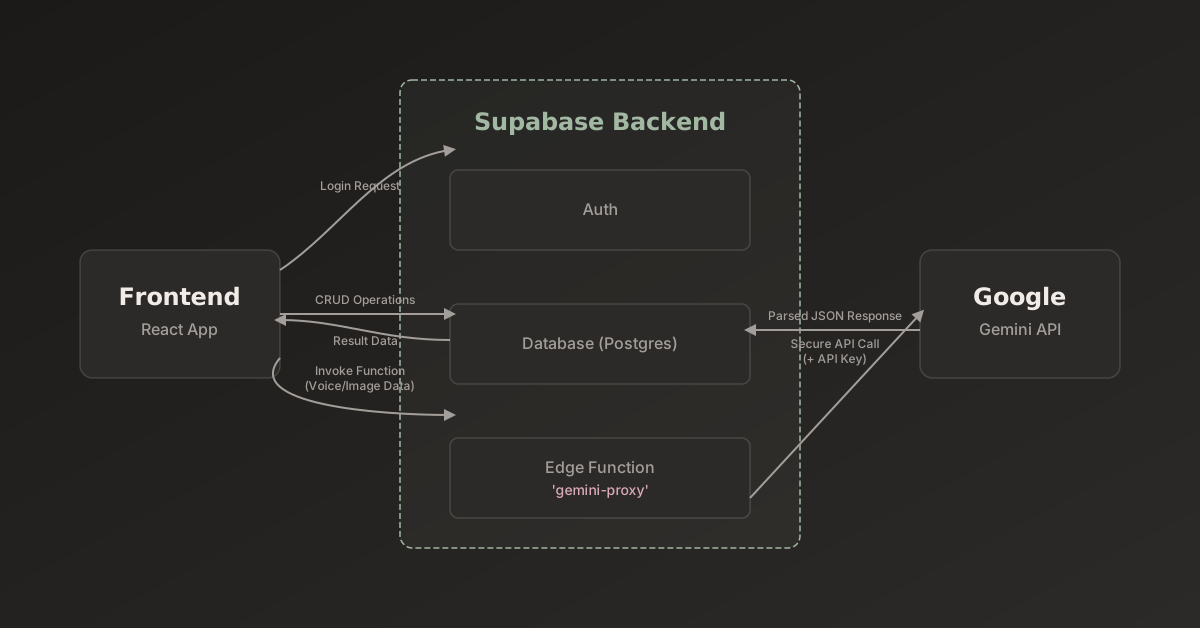
Frontend: React + Tailwind + Vite
The frontend is a clean, responsive React app, powered by Vite. I used Tailwind CSS to keep the design lean, responsive, and easy to iterate on.
This was my first time actually using Tailwind for a project, and I admit, I liked it ✅ (Especially the theme toggle functionality that Tailwind surprisingly makes rather effortless.)
The UI handles:
- Voice capture (via the browser’s
SpeechRecognitionAPI) - Receipt photo input
- Manual quick-jot entries with only the essential details: name, amount, and participant selection
- Expense review and confirmation
The key is speed and simplicity. Every input mode is optimized to capture the data with minimal friction, whether the user is speaking, snapping, or typing a short note.
Backend: Supabase as the Engine
Instead of spinning up a custom backend, I offloaded as much as possible to Supabase, which I’ve used a couple of times thus far, both for my portfolio’s custom chatbot as well as integrating custom AI models through iPhone shortcuts.
In this case, it handles:
- Supabase Auth: Secure, one-tap Google login.
- Postgres Database: Stores users, events, and expenses.
- Edge Functions: Lightweight Deno-based serverless functions for all secure logic, including talking to Gemini.
By using Supabase, I didn’t need to maintain an API server or manage infrastructure. Managed services handle the heavy lifting, keeping my codebase small and development velocity high.
Tip 👀
If you have perfectionist tendencies (like me!), try to map out a plan for your MVP to smartly allocate time to processes that are necessary and don’t have trustworthy solutions.
Keeping Secrets Secret
Integrating Gemini for natural-language and image parsing is exciting, but security is an important factor to consider (even for an MVP).
Calling the AI API directly from the frontend is a huge risk because anyone can open DevTools, inspect the network request, and grab the API key.
The correct approach is to put a secure proxy in the middle, which is why I built a secure Supabase Edge Function.
In SplitFlow, the React app never talks directly to Gemini. Instead, it sends input—voice text or photo data—to the proxy, which:
- Authenticates the user
- Constructs a structured prompt for Gemini
- Calls the API securely with the key stored as a Supabase secret
- Returns a clean, structured JSON response to the frontend
Manual quick-jot entries bypass Gemini entirely since the input is already structured, so the function just validates and stores it directly.
This ensures that every expense, whether AI-processed or manually entered, is formatted and ready for review.
Building the Supabase Edge Function
The serverless function is the core of the AI workflow. It has the following responsibilities:
- Authenticate the user using the Supabase Auth token.
- Construct the prompt by wrapping text or photo data for structured output.
- Make the secure API call by injecting the
GEMINI_API_KEYand returning structured JSON.
This pattern ensures that AI secrets stay secure, all logic is centralized, and the frontend receives consistent, predictable data.
Context Engineering: Teaching Gemini to Speak JSON
Predictable AI output is critical since apps need structured data. But one of the trickiest parts of building AI integrations is getting predictable output 😒
I spent time testing prompts in Google AI Studio until Gemini reliably returned JSON like:
{
  "description": "Concert tickets",
  "total": 150,
  "participants": ["me", "Emma", "Alex"]
}
Example voice prompt:
You are an intelligent expense parsing service. The user is at a '{eventContext}' event. Analyze the user's spoken text and extract the expense details. Respond ONLY with a valid JSON object containing:
"description" (string),
"total" (number),
"participants" (an array of strings).
If no participants are named, return an empty array for "participants".
Let’s break that down:
- “You are an intelligent expense parsing service” — This sets Gemini’s role.
- “The user is at a ‘{eventContext}’ event” — Adds situational context (e.g., Night Out, Trip, Concert).
- “Respond ONLY with a valid JSON object” — Forces structured, machine-readable output every time.
With that structure, I could reliably parse AI responses in my React app without constant debugging or data cleaning.
Note: Manual quick-jot entries already follow this structured format, so they integrate seamlessly into the same backend workflow.
Related: A Smart Free Chrome Extension That Upgrades AI Prompts
Going from Input to Database
Here’s how it all works in practice:
Voice
- User taps mic: “Dinner for me, Sam, and Jess — $84.”
SpeechRecognitionconverts speech to text- Proxy authenticates and sends prompt to Gemini
- Gemini returns structured JSON
- React app displays the parsed response in the modal for confirmation
- Expense saved to Supabase database
Note ⚠️
Speech recognition in MVP needs further refinement since different browsers handle voice recordings in nuanced ways. If you’re testing this out and it’s your first time voice recording, you may need to grant permission then exit and start up the web app again (or refresh page if not using as progressive web app bookmark).
Photo
- User snaps receipt
- Photo sent to proxy
- Gemini extracts total, date, and participants
- Review modal appears
- Expense saved
Manual Quick-Jot
- User types:
- Name: “Lunch”
- Amount: 42
- (Optional) Paid by: Defaults to user
- (Optional) Participants: Select from participants added to event
- Input validated and stored directly in database
- Review modal shows pre-filled structured data
- User confirms and expense saved
This tri-modal approach of voice, photo, or quick jot ensures capturing expenses is fast, reliable, and flexible, no matter the situation.
Making It Work Everywhere
One of my favorite aspects of SplitFlow is this flexibility:
- Voice: Hands-free, fast, conversational.
- Photo: Capture receipts on the fly.
- Manual Quick-Jot: Minimal typing for the essentials, perfect if you’re on the move, or in a noisy environment where voice isn’t practical.
Users can switch seamlessly between modes, and the backend treats all inputs uniformly.
Building an MVP the Right Way
It’s easy to get tripped up by trying to build too much too quickly when working on an MVP. I tend to do this myself, obsessing over edge cases or features that users might not even need yet (or that I might not have the time or capability of adding in the moment).
With SplitFlow, I decided to take a different approach by focusing on a tight, end-to-end slice of the experience.
This looks something like this:
- A short event context (like “Night Out”)
- Three input modes (voice, photo, quick-jot)
- One output format (JSON)
- One backend service (Supabase)
By keeping the scope small, I could focus on refining the user experience, validating assumptions, and getting to a usable product quickly.
This strategy let me launch an MVP that’s lean, delightful, and technically solid, all without writing a massive backend or managing infrastructure.
Lessons Learned
Building SplitFlow taught me a few key lessons about building modern AI-powered apps:
1. Offload Complexity to Managed Services
Don’t reinvent the wheel (when you don’t need a new model, that is).
Supabase gave me auth, database, and edge functions all in one. That saved weeks of boilerplate setup and DevOps, so why not leverage it? Plus, it’s free.
2. Keep Secrets Off the Client
Never expose your AI API keys in frontend code. Opt to always route through a backend or proxy, like, in my case, a Supabase Edge Function.
3. Prompt Engineering Is Half the Battle
Let’s be real, AI is probabilistic. You get out what you put in.
Clear instructions, well-tested prompts, and structured expectations are critical and make all the difference for reliable AI output.
4. Latency Matters for UX
Every API hop adds delay, so optimizing function performance ensures real-time experiences feel instantaneous.
The delay aspect for parsing inputs through a smart AI was something that not only can be further refined but also requires some testing and tweaking.
For instance, a one-to two-minute wait for voice parsing is far too long. An experience like that can quickly frustrate users, so it’s critical to fix.
My initial code was using a responseSchema to guarantee the structure of the AI’s output, however, this can sometimes force the model into a longer, more complex generation process, especially for a simple task. I didn’t know this; I learned.
So, how to handle it? Prompt optimization coupled with a response timeout.
Is this “perfect”? No, I’m sure it can be further improved upon, but it’s definitely a UX gain even with this early adjustment.
5. Build Small, Ship Fast
Honestly, be flexible and gracious with yourself (especially for any solo dev out there trying and learning new things).
MVPs don’t need to do everything; they just need to prove the concept.
Once people start using SplitFlow in the wild, their feedback will guide what’s next.
What’s Next for SplitFlow
Future possibilities:
- Payment integrations: Integrate with a payment service like Venmo or Cash App to facilitate easy settlements.
- Custom categories: Allow users to create and manage their own expense categories.
- Push Notifications: Notify users in real-time when new expenses are added to their events.
- Improved AI Context: Enhance the Gemini prompt with more event history to provide smarter parsing and suggestions.
Real-time group syncing, automatic participant detection, AI-generated summaries, turn into a full-on Android/IOS app with a mobile app wrapper, and the list goes on.
The core principle remains: remove friction and let the app fade into the background.
Let’s Build Smarter, Not Harder
SplitFlow shows what’s possible with modern dev stacks + AI.
A solo developer can now build secure, sophisticated MVPs in days, not months, and explore technologies they might have been too intimidated to approach (due to time commitment).
Is this only surface-level knowledge modern devs gain? One could argue either side, but for me, knowledge in code is often best gained through active application. When you learn about a bug, you research the concepts of the bug. When you need to understand how browser speech recognition differs, you learn the foundational concepts while resolving the issue you face.
At the end of the day, it all comes down to how you can leverage a tool like AI to solve a problem.
With SplitFlow, I created an experience that’s functional and genuinely delightful by focusing on the user pain point — the annoying pause during live expense capture — and providing voice, photo, and quick-jot inputs.
It’s a small thing, but it transforms real-world moments by letting friends stay in the flow instead of wrestling with a phone.
Give it a try, share your thoughts, and I’ll see ya next time!


