

When an AI agent keeps getting something wrong because it doesn’t know the project, my first fix is usually to write it down. In a Markdown file, rules file, or into something the agent reads automatically, so I stop re-explaining the same conventions every session.
It’s a sensible first move. It works for a while.
Then it stops working. And “stops working” turned out to mean a few different things that don’t share the same fix, which I didn’t appreciate at the time.
Sometimes the file gets too big and starts talking past itself.
Sometimes the information in it goes stale.
And sometimes the agent needs to check something a file can’t describe accurately at all, because the answer depends on what’s true right now, not what was true when somebody wrote it down.
I spent longer than I should have treating all of these like the same problem. (They’re not the same problem—that’s what this post is about.)
Why My AGENTS.md Files Kept Going Stale (Even When Well Organized)
Every one of these files stayed accurate for as long as one person was the only one touching the project.
Then a second or third teammate starts making changes, and the files drift from what the codebase actually does, and nothing in the system tells anyone when that happened.
Nobody gets a warning. Nothing turns red. The file just stops being true.
An instruction file can reference a convention the team abandoned weeks ago, and since it’s a Markdown file, it doesn’t fail the way code does.
Nothing checks whether the rule is still true, because it’s plain prose with no owner and no schedule.
In a way, a stale rule is worse than no rule, because no rule makes an agent cautious while a stale one makes it confident.
My agent would read a design-system rule that had stopped matching the actual components, follow it anyway, and only sometimes catch the mismatch. Whether it caught it or not depended entirely on which run I got and how sharp the model happened to be that session.
This isn’t a system; it’s a coin flip 😬
Tip: For anyone hitting this exact “only sometimes catches it” failure, don’t start by rewriting the file. Rewriting fixes a confusing file. It doesn’t fix a file nobody is required to update.
Largely because nothing in the setup forced an update. No check ran when someone shipped a change, no review step touched the rules file, and there was no signal anywhere that a file had drifted from the code it described.
The file looked exactly as authoritative as it had the day someone wrote it, whether or not that was still true.
My solution at first was to reorganize. I spent way too long breaking them into smaller files per concern, clear rules files, a docs directory so nothing needed rediscovering. That helped a little, but it didn’t touch the actual problem because the problem was never how the information was arranged.
The issue was that the information went out of date the moment someone made a change, and nobody was required to update the file that described it. However you arrange stale information, it’s still stale.
Related: All You Need To Know About AI Workflow Files And How To Use Them
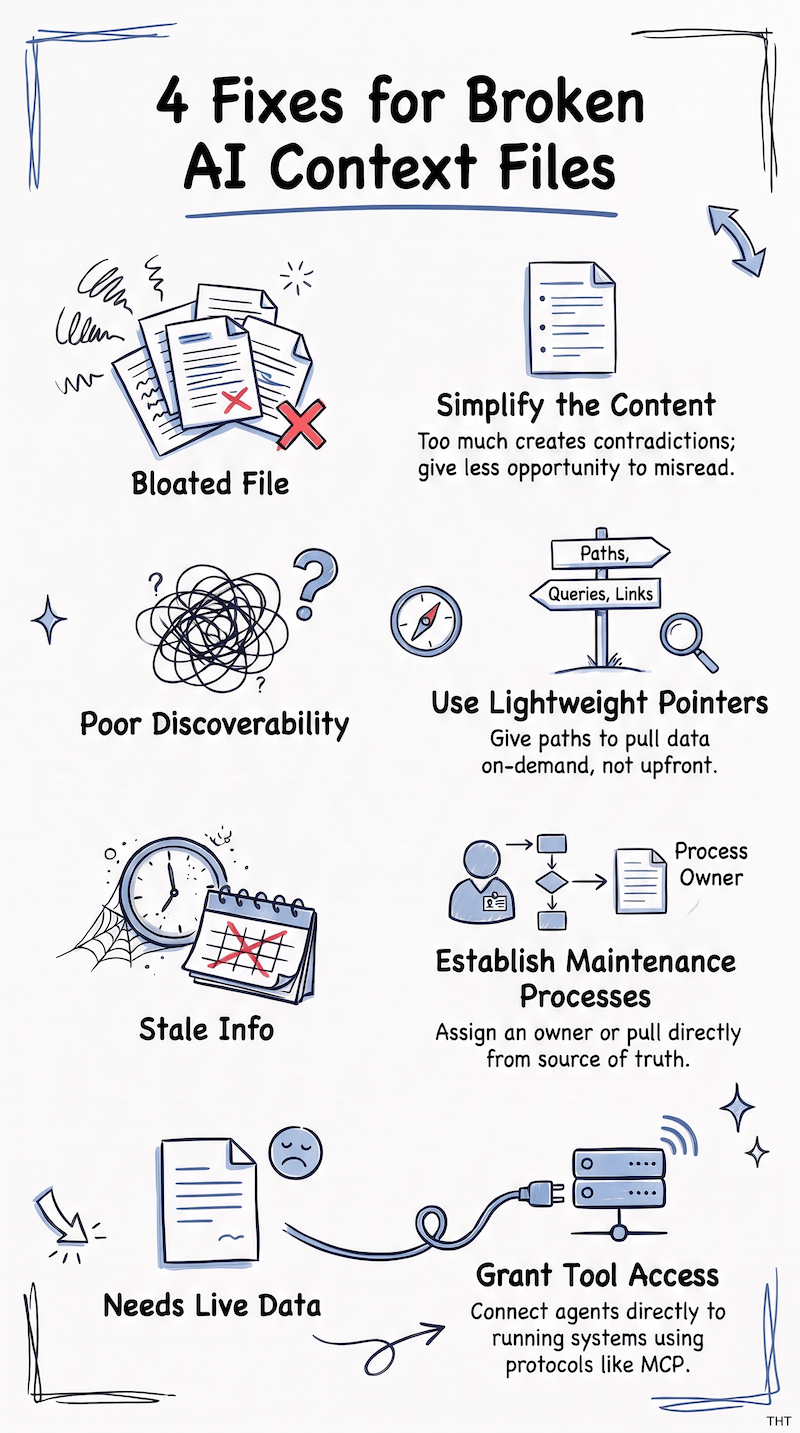
The Four Reasons a Context File Stops Working, and the Fix for Each
Four different things can go wrong with a context file, and each one needs a different fix instead of a trip straight to tooling.
Here’s the breakdown I wish I’d had before I started reorganizing things:
1. When a Context File Gets Too Bloated to Trust
The first is bloat and contradiction. A file absorbs months of edge cases, one “just this once” exception at a time, until it talks past itself.
When that’s what’s happening, simplifying it is the fix. No need to replace it outright.
A February 2026 study from ETH Zurich and LogicStar.ai tested coding agents against real GitHub issues, with and without generated context files. Adding one lowered how often agents completed the task successfully, and raised the cost of each run by more than a fifth.
More context didn’t make the agent more capable. It gave the agent more to misread.
Note: Systems of workflow files are a little outdated by this point. Though everyone was showing their workflow file structures in 2024, most newer models are capable enough to reason with fewer instructions (they’ll give you better results).
2. When an AI Agent Can’t Find the Right File Fast Enough
The second is discoverability. If an agent has to read ten files to find the one line that matters, the fix is better retrieval, not a better file.
Anthropic’s write-up on context engineering recommends giving agents lightweight pointers: file paths, stored queries, links. The agent then pulls in the content only at the moment it needs it, instead of loading everything up front.
Explore: Is Prompt Engineering Still Worth Learning? What to Learn Next (and When)
Note ⚠️
This is a different fix than simplifying, and it won’t help a file that’s simply wrong. A wrong file with great retrieval just gets found faster.
3. When the Information in a Context File Goes Stale
The third is staleness, which is the one that actually hit me. When the documented information itself changes, the problem lives in what the file describes, and no amount of rearranging touches that.
You can alphabetize a lie, but it’s still a lie. I checked, extensively, with folder structures.
The fix is a structured maintenance process with an owner. Or it’s pulling the information from wherever it actually lives, instead of relying on a copy of it that’s slowly going off (spills onto section below).
4. When an AI Agent Needs to Check a Live System Instead of a File
The fourth is needing to check something live. Some information can’t be described accurately in prose at all, because it changes too often or depends on the current state of a running system.
That’s a tool-access problem, and it’s the only one of the four where connecting the agent to the live system is the actual fix.
MCP, the Model Context Protocol, is an open standard for connecting an agent to external tools and data without a one-off integration for each pairing. Anthropic introduced it in November 2024, and it’s one way to build that tool access.
Mind you, it doesn’t do anything for the other three.
Introducing it to fix bloat or staleness just adds a new layer on top of a problem it was never built to solve, and now you have the original problem plus a server to maintain.
I bring it up here because the fourth category is where my own situation actually ended up.
What Multiple AGENTS.md Files Couldn’t Do for a Multi-Project Setup
The clearest version of this, for me, was a WordPress agent I maintain across several projects. Four or five people touch these projects at once, and keeping a Markdown file current was never anyone’s actual job.
In theory, it was everyone’s job, which in practice means it was nobody’s job, which means the file aged like milk 🫠
I’d ask the agent to build a block for a specific project. On a good run, it would notice the rules file described a component that didn’t exist anymore, and stop to ask me about it. On a bad run, it just built the thing the outdated way, and I only caught it while reviewing the diff.
Same prompt, same project, different day, different result. I never knew which agent I was getting until the diff appeared.
Organizing AGENTS.md and Rules Files Across Multiple Projects
The old system was a root-level AGENTS.md per project. That’s the markdown file most AI coding tools read automatically.
There were also separate rules files laying out each project’s design system. A docs directory held anything that needed a quick reference instead of rediscovery.
I’d scoped each file tightly per project, so nothing was buried under information that belonged somewhere else. The rules files covered real specifics like the actual conventions each project had to follow to stay consistent.
On paper, this setup was fine. I want to be fair to past me here; the setup was thoughtfully (and dare I say strategically) laid out.
What none of it could do was check itself against the actual codebase.
Why an AGENTS.md File Can’t Tell When a Design System Changes
A rules file describing a design system is a snapshot, written at one point in time by one person.
It stays exactly that snapshot, no matter what the codebase does afterward, and the codebase does a lot afterward; that’s the whole job.
There was no mechanism for the file to notice that a component had been renamed, or that a convention had changed.
It also couldn’t tell when a teammate started doing things a different way on a different project, which happens constantly and nobody announces it, because why would they? They just needed the thing to work.
The agent also had to do all its own stitching together. Working on one project meant reading that project’s AGENTS.md, then its rules file, then whatever was in the docs directory, and assembling a picture from three separate sources that may or may not have agreed with each other, or with the code.
That’s a lot of reading before the agent has done anything, and none of it tells the agent whether what it just read is still accurate.
The real problem was a description with no way to check itself, and a better-organized file was never going to close that gap. A file can be as clean and scoped as you want and still describe something that no longer exists.
What I built next was a way for the agent to check a description instead of just trusting it.
What a Custom MCP Server Changed in My Workflow
What complemented, and to a large part replaced, most of those workflow files is a custom MCP server, built in my case for WordPress. I point it at one project’s files at a time, and reuse the same server across every project I work on.
The core piece is that it builds a searchable index of the project instead of just describing it in prose.
Though this particular MCP serves a WordPress setup (since that was the real need of the team), nothing about the shape of it is WordPress-specific.
This recipe works on any stack:
- Index the system instead of describing it.
- Give the agent tools that query the index.
- Sync real data down safely, with a backup taken before anything destructive.
- Let the agent check reality instead of trusting a summary.
Note 💬
I said index, not embeddings. Don’t confuse this as generating vector embeddings that will gauge intent. That is somewhat overcomplicating it and you’re going towards over-engineering. I encourage you not to listen to general advice, but to actually look up and do some basic research on what better serves the models that you’re using right now, instead of any advice that was mainly for a model a couple of months ago, a year ago, two years ago, you get the gist.
How the Server Builds a Searchable Index
Running build_wp_index builds that index straight from the project files. It covers posts and pages, post meta like ACF and other custom fields/attributes, and theme and widget options.
It also covers navigation menus and the pattern and template files on disk. Paths resolve either way correctly, whether the project uses a classic wp-content layout or Bedrock’s app layout.
That index is what tools like find_similar_content and where_is_used actually query.
I can ask something as plain as “Where is .footer-disclosure used?” and the agent checks the index (with a structured query) instead of guessing or reading several files aimlessly.
Syncing a Local Database From a Production Dump
The other piece is sync_local_db_from_dump. It takes a SQL dump I’ve already downloaded from the live site and imports it into my local WordPress database.
It rewrites the live domain to my local URL automatically. It can also apply other replacements at the same time, like an API host or a token value.
Before anything destructive happens, it exports a backup of the local database first. If the import or the replacement fails partway through, that backup is still there to restore from. (The backup isn’t decoration, but part of what makes the rest of it safe to run.)
There’s also query_wp_db_readonly, for anything the file index doesn’t model well: published versus draft status, real slugs, meta joins, data that lives in plugin tables.
Between these two tools, the agent isn’t only working from a snapshot of the code but can check the database directly when the index isn’t enough 😌
Note: None of this keeps itself current automatically. If search results start looking stale, the fix is rerunning
build_wp_index, not re-reading every file by hand. It supports incremental updates as well as full-on re-indexing. A connection to the live instances is also something that can be supported with some tweaking and logical changes.
Why Centralizing Tools in One MCP Server Made Maintenance Easier
The part that’s actually made the biggest difference is maintenance, more than the day-to-day implementation work. Since the server’s code lives in one place, adding a new capability is one change instead of a round of edits across every project’s rules files.
The Bedrock support is a good example of that. Bedrock is a WordPress boilerplate that renames the wp-content folder to app inside a web directory.
A teammate needed the indexer to handle that layout for one project. I added that path resolution once, in the server itself. Every project running the same server picked it up, without anyone touching a separate rules file.
One change, and it was just true everywhere the server ran.
It’s become something like a local brain for the projects I work in, one that just needs pointing at what changed.
This solved the two problems I initially had:
- Information was changing faster than anyone updated a file.
- The agent had no way to check reality before acting on what the file said.
Bloat was never the issue here, so simplifying the files alone would never have touched either one.
What MCP Actually Solves, and What It Doesn’t
MCP solves one problem. It gives an agent a standard way to connect to an external tool or data source, instead of a one-off integration for each pairing.
One problem. And honestly, that’s enough; it’s a good problem to solve.
The protocol itself doesn’t touch anything written in a prompt or a rules file. It only changes how an agent reaches things outside its context.
What MCP Won’t Fix
That means MCP won’t fix a bloated context file, and it won’t fix one that’s just organized badly.
Those are prompt and documentation problems, fixed only by editing the prompt and documentation, which is less fun than building a server and also, annoyingly, the actual answer most of the time 💁♀️
Explore: A Smart Free Chrome Extension That Upgrades AI Prompts
It also won’t fix a file where the information is correct but hard to find. That’s a retrieval problem, better solved with clearer structure, or a smaller set of references the agent loads on demand.
Don’t confuse that with the index, though. The index didn’t make my files easier to search. It took the searching out of the files.
“Where is .footer-disclosure used?” was never a documentation question, and no rules file could have held the answer, because it changes every time someone touches the code.
Finding a line inside your own docs is a structure problem. Finding what’s true inside the system is a checking problem. They look alike from a distance, but they’re not the same fix.
And staleness, since that was one of my two problems, deserves the precision. MCP doesn’t keep anything current. The index goes stale too, which is why rerunning build_wp_index exists.
The server didn’t stop my information from going stale, but gave the agent tools to check the index and database instead of letting it depend on a copy that may or may not be current.
A stale file is a maintenance problem. Mine had quietly become a checking problem.
Note 👇
People often describe MCP as a memory system but that’s a mismatch. While it connects an agent to a system, remembering what that system contains is a separate job, handled by memory tools. The MCP answers “can the agent reach it,” not “does the agent remember it,” and confusing those two is how you end up disappointed with a perfectly good protocol.
Where MCP Actually Helps, and What to Try First
MCP is your tool if something changes too often or too unpredictably to describe accurately in prose. That’s where the agent needs to check a system’s current state instead of trusting a description of it.
That was my situation. It might not be yours.
The only way to know is to look at which of the four problems you’ve actually got before reaching for a protocol, because the protocol is the most expensive answer on the list and three times out of four it’s answering a question you didn’t have.
Before building anything, I encourage you to test the cheap fixes first.
This means trimming the file and seeing if the agent still gets confused. Adding a reference the agent can look up instead of loading everything by default, and see if that solves the discoverability issue.
Cheap, boring, diagnostic. Do those first. Reserve complexity for the systems that actually require it.
Tip: If the agent is still confidently wrong after making the simple, boring fixes, the reason is usually that the world it’s describing keeps moving. That’s when tool access becomes the actual answer—not before.
It’s a Wrap
Looking back, slowing down long enough to ask which problem I actually had saved me more time than any single fix did.
I treated four different problems as one and reached for reorganizing, which fixed nothing, because my problem was never messy files. I have the reorganized folders to prove it.
If you’re staring at a context file that’s gone wrong somehow, start there too. Identify which of the four you’re actually dealing with before you touch anything else.
A smaller file solves a different problem than a better retrieval setup, and both solve a different problem than mine did. Picking the wrong one means doing this twice.
For anyone curious, check out the wp-agent MCP and let me know how it works in your local workflow. And anyone who uses it as an idea base for their own advanced tooling, let me know (I love hearing things like this) 🤓
Keep exploring and refining workflows and skills!
I’ll see ya next time.
Bye.


