

Every month, my management company uploads two PDF bundles to AppFolio. One has invoices, the other accounting data, and nobody opens either. They’re scanned images stuffed with accounting jargon, and honestly, who has the time?
Instead, unit owners get group emails: “pay $450,” “assessment fee due,” “maintenance work scheduled.” There’s no context or visibility into where the money actually goes.
Then the questions start.
In the building group chat: “Why are we paying for pest control when nobody’s seen anyone come by?”
Or me, staring at my own bank statement: “What even was that $200 charge last month?”
The management company’s answer is always the same: “Check the AppFolio bundle.” Which nobody’s opening because it’s tedious and impenetrable.
I built HOA Connect because I got tired of paying for things without knowing what I was paying for. A comparison widget I added later ended up proving the point by surfacing two straight months of doubled water and power charges.
Was that a lump-sum catch-up? A billing error? Nobody knew, because nobody was looking closely enough to catch it 🙈
So I ended up building a three-layer system:
- A shared dashboard people can log into
- Messy invoice PDFs that turn into structured payables only after a human reviews them (never auto-posted by AI)
- A way to ask questions like “show me all the utility bills from January” without rebuilding a pivot table every time
The one line I wasn’t willing to cross? Sending association invoices with real account numbers and real names to a cloud LLM by default.
And I wasn’t going to let AI write anything to the books without someone approving it first.
This post is an architecture breakdown of how those three pieces fit together and why specific tradeoffs mattered once real money and neighbors were involved.
I hope that it will inspire you to build your smart solution to that everyday problem!
Why a 4-Unit HOA Needed Custom Software Instead of AppFolio Alone
A 4-unit building doesn’t need enterprise property management software. What it needs is visibility into what it’s actually paying for since the PDFs already exist and management uploads them every month.
But those PDFs are scanned images that are painful to parse, and OCR (optical character recognition, the tech that turns a scanned image into readable text) struggles with the formatting.
Related: How To Build A Wicked Cool App With React + Flask for more on PDFs and OCR parsing.

There’s also a human problem underneath the technical one. I’m already paying a management company to manage finances. Who wants to take on extra work to make sense of data that should’ve been surfaced clearly in the first place?
It gets me puffing the more I think about it.
Of course, the lack of visibility stops being someone else’s problem the moment you’re hit with an assessment fee nobody can explain, or you catch a double-billed utility charge because you happened to build a comparison widget. At that point it’s yours to solve.
We’re not done though, there’s a privacy angle too, and it’s not a small one. Would you paste a document with your neighbor’s bank account number into ChatGPT?
I wouldn’t, and that alone ruled out the easy path 😬
For any HOA operator stuck in the same spot, paying for management that uploads bundles nobody opens, this is your job story.
For a builder curious about hybrid OCR plus local vision-LLM plus human review plus local semantic search, this is a real implementation you can mull over.
The repo’s private (for obvious reasons), but every architecture choice here came from a constraint I couldn’t ignore, and those I’ll share in detail.
Why I Rebuilt the Document Pipeline Three Times
My first idea (the simplest one) was to point a local vision-capable model straight at the raw PDF and let it read the thing directly. No OCR step or preprocessing needed; just hand the model the document and ask it to extract the invoice data.
Skip the whole pipeline and let the model do it in one shot. Why not?
Well, that quickly fell apart. These PDFs are scanned images, not clean digital text, and they’re multi-invoice dumps with check covers mixed in as separators.
A vision model looking at the raw file couldn’t reliably tell a check cover from an invoice, and it kept losing track of which page belonged to which line item. The format itself was the problem, not the model.
Cloud never entered the picture, for what it’s worth. These documents have account numbers and real names on them, and sending that straight to a hosted API was off the table from the start.
So when the direct approach didn’t work, the next move was local processing end to end: OCR the PDF, then extract fields, all on my own machine.
Challenges of Local Processing and Resource Management
This is where I ran into a different wall because executing OCR and extraction on my laptop depleted my disk space, and the whole machine would lock up or crash mid-run. (For anyone who followed my LinkedIn serial posts, I shared a lot of this happening in real-time.)
It was definitely not a formatting problem this time but a resources problem.
I needed the heavy OCR pass to happen somewhere that wasn’t my laptop, while keeping the actual data processing local.
That’s the version I ended up building:
- OCR runs in GitHub Actions, against my Supabase instance, using a Docker image I control (this was me seriously solution-ing.)
- Field extraction still happens locally, on my machine, through Ollama.
- The PDF briefly passes through a GitHub runner running my code. Nothing else touches it, and no third-party LLM ever sees it.
The Three-Layer Architecture Behind HOA Connect
Once I had the OCR problem solved, the rest of the system came together as three layers stacked on top of each other.
1. Shared Ledger
The shared ledger that everyone logs into consists of a Dashboard, Maintenance tab for issues, Finance tab for payables, and Units view.
People log in, see what they owe, and see what already got paid.
It runs on Supabase Auth and Postgres inside a Notion-inspired SPA (single-page app), and access control is creator-owned writes plus row-level security (meaning the database itself enforces who can touch which rows) rather than a full role-based permission system.
Explore: AI Agents Need a Resume, So I Built Them One for more relationship-based Supabase work.
2. Document Intelligence
Document Intelligence refers to the pipeline I just walked through:
- A PDF comes in, gets OCR’d and laid out through GitHub Actions and my
document-workerimage - Its fields are extracted locally through Qwen-VL running on Ollama
- It sits for review before anything publishes to
payablesorfinancial_summaries.
AI proposes while I publish. Owners never see a draft or a confidence score, only the finished result.
3. Local Admin Assistant
The local Admin Assistant is a chat interface that only runs on my machine.
It tries keyword matching first, falls back to Gemma for JSON classification if that misses, then hits structured Supabase tools for pulling amounts and months.
Local nomic-embed-text embeddings, stored in SQLite rather than pgvector or any cloud service, help it find the right entity when a question is vague.
Ask it “what did we spend on gardening in June?” and it either gives you the number or tells you there’s no data. It doesn’t guess.
Note: A single rule that runs through all three layers is that Finance and the Dashboard only ever read published rows. Document Intelligence doesn’t replace manual entry, it sits beside it.
Layer 1: A Shared Dashboard Every Owner Can Actually Log Into
The first layer is the place every owner, not just me, can check to see what’s due, what maintenance issues are open, and how much the association spent last month.
I built it for myself first, but in a way that hands the other owners the same transparency I wanted.
Everyone wanted visibility. I happened to be the one who sat down and built it 💁♀️
The Surfaces and How Access Is Split
The app has four surfaces:
- Dashboard (KPIs, bulletin, finance glance)
- Maintenance (issues with optional expense links)
- Finance (payables with flexible splits)
- Units (cards showing owner names and current balance)
The client is a React 19 plus Vite SPA with in-memory view state, no React Router.
Supabase Auth handles login, profiles link to units, and, for local dev convenience, my unit (plus an environment guard for hardening) acts as the admin account.

A few product choices keep it sized right for a tiny HOA instead of ballooning into something enterprise-shaped:
- 4-unit share math. Association-wide costs split by 4. Single-unit costs go 100% to that unit. Custom shares apply when needed, like a repair that only affects Units 2 and 3.
- Payable-issue link. An optional
related_issue_idties an expense to the maintenance issue that funded it. - Partial settlement.
paid_unitstracks which units already Zelle’d their share while the payable itself stays open. - Multi-unit issue scope.
affected_unitshandles repairs that aren’t “everyone” and aren’t a single unit either.
Authenticated owners can create payables and issues with any split, but they can only update or delete rows they created themselves.
Admins keep the full manage path, and that’s plenty for a 4-unit building. It wouldn’t scale as-is to an enterprise tenancy product, and I’m fine with that.
Note 👀
Manual “New Payable” entry still exists on purpose. Plenty of maintenance expenses start in the group chat, someone fixes something, and we need to track who paid and how the cost split. Document Intelligence handles the management company’s uploaded bundles. Manual entry handles everything else.
Layer 2: Turning Scanned Invoice PDFs Into Structured Ledger Rows
The core problem here is that AppFolio bundles are scanned images, not structured PDFs, so OCR struggles with the formatting.
They’re also multi-invoice dumps with check covers acting as page separators, and extractors (along with humans, honestly) confuse check numbers with invoice numbers constantly.
Evidence bounds can latch onto the wrong page, which means the system might propose a check cover as if it were an invoice.
That’s exactly why the human review gate matters. I’ve watched it propose the wrong thing often enough to know it can’t be trusted blindly.
An overview of the flow: upload → OCR/layout → local field extraction (produces structured data) → review → publish to payables or financial_summaries.
How OCR Runs Without Touching a SaaS Vendor
The heavy OCR and layout work (Docling plus PaddleOCR) runs inside a Docker image called document-worker, typically triggered via GitHub Actions against the association’s Supabase instance.
During this process, the PDF briefly touches a GitHub runner running my image, writing OCR output into my database.
Field extraction happens afterward, on my own machine, through Ollama running Qwen-VL via extraction-worker.
Tip 💡
Splitting it this way keeps the heavy compute off my laptop while keeping the vision-LLM structuring local.

Why Nothing Publishes Without a Human Clicking Approve
Even once a document reaches ready_for_approval status, an admin still has to click publish.
There are no silent writes to the ledger, ever 🙅♀️
Owners never see drafts, confidence scores, or rejected documents (well, all owners but me). They only see the published Finance view and Dashboard insights.
How One PDF Bundle Becomes Several Reviewable Invoices
A multi-invoice PDF becomes child documents, one per detected invoice, and the parent itself isn’t approvable.
Each child gets reviewed independently.
Check covers act as separators, and the segmentation logic tries to avoid mistaking them for invoice identity, but it’s not perfect. That imperfection is one of a couple of examples that show why the review remains mandatory.
Note 👇
There’s a specific assumption that invoice bundles include check covers (our separators) since that’s the case for the documents produced by my HOA management. However, it’s also what would entail further work if I were to scale or apply the system to an entirely different management company. When you don’t have a single reliable source of structured data, not only do you need to architect one but you must be sensitive to the source(s) of that data.
How Recurring Vendors Get Recognized Without Skipping Review
Right now, the system learns vendor patterns across months as an assistive match. It was an idea I had to mimic model training so that we get an HOA-trained data model for this particular case.
The suggestions are easy to ignore or overwrite, and we never skip review just because a pattern matched.

How it works: Approve a landscaping invoice in March, and if the same vendor shows up in April at the same amount, the system can surface that connection. I still approve or reject it myself. It’s ultimately a hint, not an authority.
The Processing Center is the ops surface where statuses move from uploaded → parsed → needs_review / ready_for_approval → published and where retries, batch ingest, and pipeline KPIs take place. It’s where I see the queue, reprocess when something’s stuck, and understand what’s actually blocked.
Note 🧐
Persistence in Supabase covers the app backend (Auth, Postgres, Storage for PDFs). That’s not “cloud AI.” OCR may briefly touch GitHub runners on the Actions path, but extraction never defaults to OpenAI or any third-party LLM. There’s no silent cloud fallback if local Ollama happens to be down.
Layer 3: A Local Chat Assistant for Answering “What Did We Spend on X?”
What would a 2026 data dashboard be without conversational AI? Naturally, the third layer is the one I reach for when questions come up in the group chat, or when I’m trying to understand a charge myself.
Things like “what did we spend on pest control?” or “which months was that utility bill doubled?” without opening multiple PDF bundles and cross-referencing them by hand.
Why build this at all? Because when you’re trying to figure out whether you got double-billed, or whether a vendor actually appeared, a flat list of payables doesn’t help much.
The Dashboard already has a vendor comparison view built in (2 to 4 months, matrix layout), and that’s exactly how I caught the doubled utility charge in the first place.
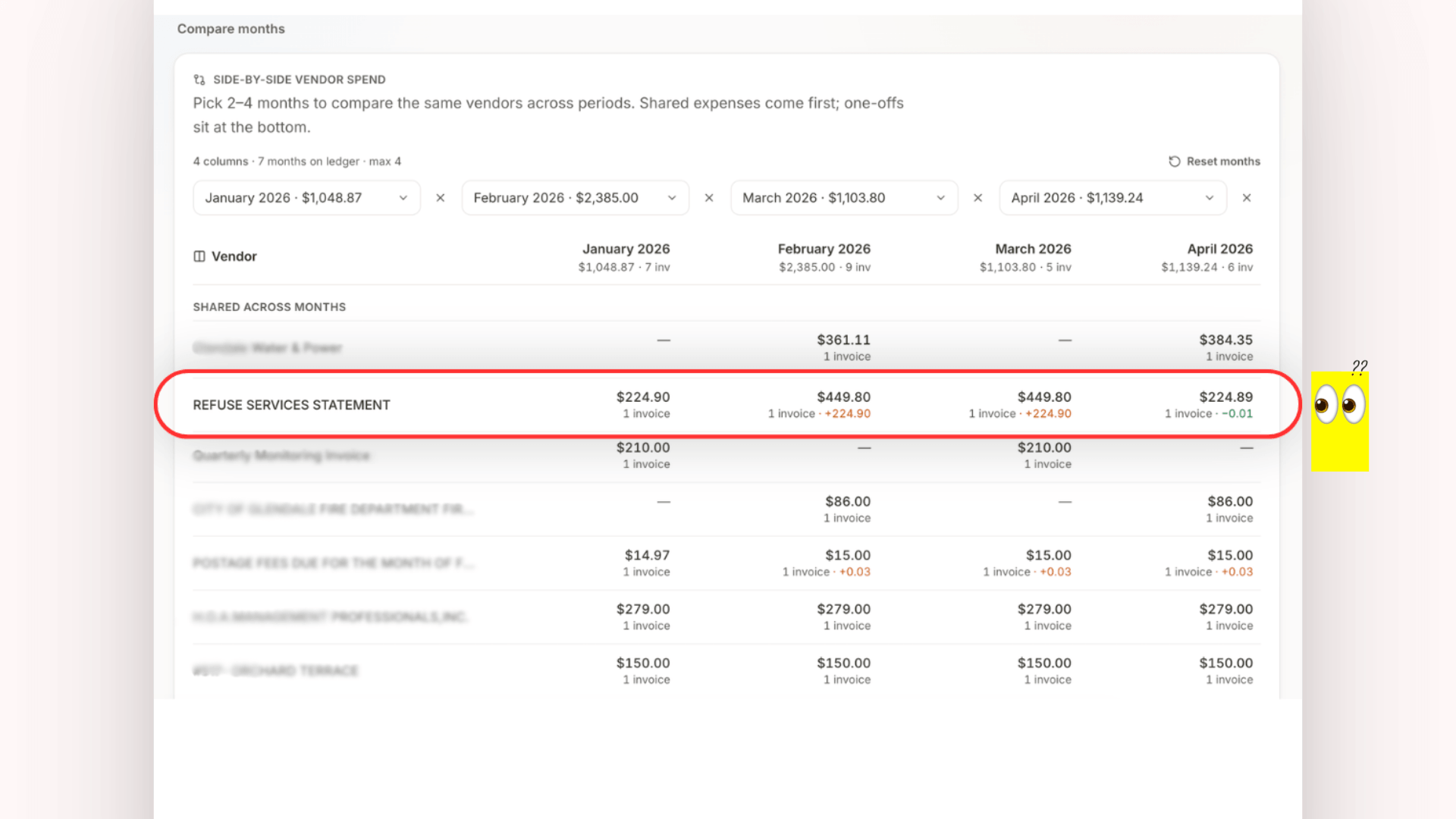
But sometimes I want to ask in plain language: “show me all utility bills from July” or “when did we last pay for pest control?” (It’s totally not laziness but a 2026 habit.)
How the Assistant Decides What You’re Asking
The routing goes keyword intent first, since that’s direct and fast for clear asks like “monthly expenses.” If that misses, it falls to Gemma for JSON classification, then to structured Supabase tools for pulling amounts and months.
Local semantic search (nomic-embed-text embeddings, stored in SQLite under admin-assistant/data/, not pgvector or any cloud embedding service) helps find the right entity when the query itself is vague.
The tools return the actual totals while the embeddings narrow the search space first.
Related: Let’s Build An Insanely Useful Local AI Agent With Docker

Boundaries matter here too since this runs on localhost only:
:5173for the floating chat widget:5180for the expanded UI (yeah, I’m a little extra, THT-ers know):8092for the API
This local Assistant is not in production builds. When the client SPA gets deployed, the assistant simply isn’t bundled with it.
And when the assistant’s tools come back empty (no matching payables), it never invents a number. It tells me there’s no data instead.
Hey! I want to clarify that this part of the local assistant was yet another place I ran into hardware constraints. There’s no getting around the fact that any heavy processing or detailed embeddings work take a toll on your machine. So, yes, in a way what I ended up having so far is a tad more constrained than what I know I can make it be. I’m trying to deal that (mentally).
Explore: Why OpenClaw And Hermes AI Agents Aren’t Actually Free for more struggles with hardware when it comes to local AI.
How the Three Layers Work Together
Document Intelligence writes into the same payables and financial_summaries shape that the Dashboard and Finance views read from.
There’s no separate “AI ledger” sitting off to the side. A published payable is a published payable, whether I typed it in by hand or it came from a reviewed extraction.
The Assistant reads that same source and queries payables, issues, financial_summaries along with the semantic index built from those tables. It doesn’t replace review, and it doesn’t propose new payables on its own.
An AI Assistant here is purely a read layer for admins who want natural-language access to what’s already published.
Multi-person login is the trust surface for the ledger itself. The privacy-aware AI pieces (extraction and chat) stay scoped to my machine:
- Ollama on my laptop for extraction
- localhost-only FastAPI plus Gemma for the Assistant
The other owners log in and see the published ledger and Dashboard insights, no drafts, confidence scores, or AI surface at all from where they’re sitting.
So far this suits us all fine since everyone else only cares to see what they paid, when they paid, and how much. Making the AI assistant public is a whole other ball game.
Where HOA Connect Still Falls Short
This is built for one “building” with 4-unit assumptions baked in everywhere. It’s not multi-HOA SaaS.
The share math and the admin checks both assume that scope, and I’m not trying to replace AppFolio or build a full enterprise property management suite here.
Note: It would have been absolutely amazing if I could access the data from AppFolio, but they’re rightfully picky about that.
Meanwhile, the Actions OCR path isn’t “laptop-only”. The PDF briefly touches a GitHub runner (running my image, writing to my Supabase instance), so it’s not 100% air-gapped.
Field extraction stays local through Ollama, but the OCR portion itself runs on remote compute. That’s the tradeoff I made (one I had to make), so admins wouldn’t need to run heavy OCR locally.
And let’s not forget that the Assistant is a builder tool I use myself, not a shipped production feature. When I deploy the client SPA for the other owners, the assistant code isn’t bundled in. It stays localhost-only, on my machine.
Tip 👇
If I ever wanted to ship the AI Assistant as a feature for everyone, I’d need to rethink the authorization model, what data it can touch, and whether I’m comfortable running a hosted FastAPI plus LLM stack instead of keeping it localhost-only.
It’s a Wrap
One of my main takeaways during this project is that propose does not equal publish. And this is super important the more we integrate AI into the processing and parsing of information.
Document Intelligence is a proposal layer.
The Admin Assistant is a read layer.
The shared ledger stays accurate because nothing writes to it without review, be it AI or even me on a day I click the wrong thing.
I’m still not managing the accounting myself. We still pay a management company for that. But now there’s visibility into what they’re actually managing.
When an assessment fee shows up, or a charge doesn’t add up, I can look and actually understand it instead of pointing at an unopened PDF bundle and shrugging.
If you’re building something similar (local-first finance tools, hybrid OCR plus vision-LLM pipelines, or privacy-aware document processing in general), I’d love to hear how you’re handling the line between AI proposals and published data.
Or how you’re keeping sensitive documents out of third-party APIs.
What’s your line for what an AI gets to touch without a human checking first?
See ya ✌️


